Home
Home News
News Products
 Support
 User Forum
 Contact Us
 Site Map
 Search
 About
About Language
 Page Bottom

 Overview
 Screen Shots
 Manuals & Demos
 Compare Editions
 Buy Now
 Download
 Prerequisites
 FAQs
FAQs Release Notes
 Overview
Product Abstract


How It Works - Sound Mill allows you to play multiple audio files simultaneously with one button click for theater production scenes. Each sound can be timed to play at a precise instant to create an intricate soundscape. The audio files can reside on your computer hardrive, local network, or can even be sourced from the Web, such as an Internet radio site. Cross-Fade music playlists by a simple mode setting. The Auto-Fade-In/Out feature can automatically fade-in music on Play/Resume, and fade-out on Stop/Pause. In Retail Environments and Event Venues, you can pipe playlists of music and have the music interrupted with recorded announcements (sales promotions, event dates, etc). These announcements can be played at regular timed intervals or inserted after a number of music track play. Time of day announcements (ex. "Store is closing in 10 minutes.") can be scheduled to play at exact time of day. Stand-up performers can use a wireless remote control device to control play of sound cues and music tracks that accompany their act. The Easy Player is also well suited as a touch screen tablet interface. Haunted Mansion Walk-throughs can pipe music and sounds to multiple zones (rooms), each zones with its own sound tracks.And there is a lot more. See the Key Features below.
 To Page Top
FYI
Special Offers
 Special: 25% to 30% Off
As a special promotion and for a limited time, we are offering most products at 25 to 30% off the regular sale price. See the product "Buy Now" page for applied discounts.
Special: 25% to 30% Off
As a special promotion and for a limited time, we are offering most products at 25 to 30% off the regular sale price. See the product "Buy Now" page for applied discounts.
Evaluation Key
 Get an Instant, 30-Day Evaluation Key.
It will unlock all the features of the program for all editions and allow you to save your work. No obligation. No order forms. No marketing emails -- Just a key. Enjoy.
Get an Instant, 30-Day Evaluation Key.
It will unlock all the features of the program for all editions and allow you to save your work. No obligation. No order forms. No marketing emails -- Just a key. Enjoy.
Operating Systems
 This product runs on:
Windows 11/10/8/7
64bit, 32bit, and "N" editions
(See a few exceptions.)
Customer Stories
 Read how our Customers have excelled! And please consider joining our Customer Stories Program. We want to hear your story!
No Special Hardware Required
Your audio setup can be as simple and mobile as a laptop computer with connected or wireless computer speakers (including Bluetooth); Or as sophisticated as a desktop or server with multiple soundcards; Or a professional grade audio adapter with multiple I/O channels. If the I/O channels appear in the Windows Control Panel > Sound Playback devices list, they should be recognized by Sound Mill . For businesses on a budget, you can use external soundcard adapters (for about $10 each) with a USB hub to pipe sound to as many zones as you need.
Automation
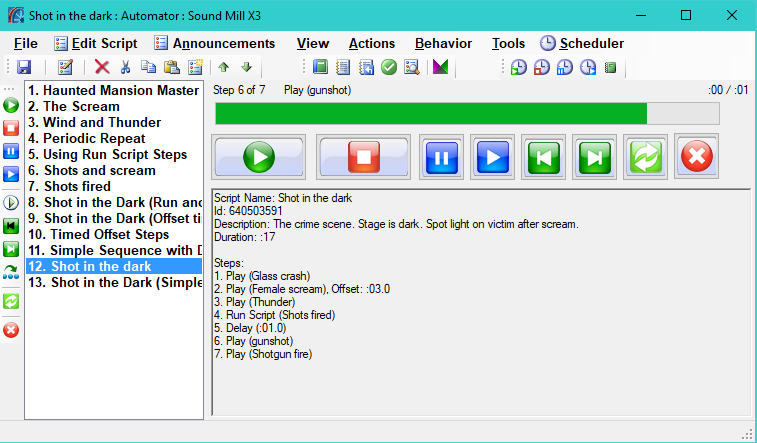
With the Automation Manager, you can quickly create scripts that group several sounds for sequential play or timed to play relative to the start of the automation script. Quickly create multiple playlists of music. You can manually run your automation or schedule it to start at a time of day. Automation can achieve just about any timed sequence of sounds that you can envision. A one script can start and control other scripts for powerful results. You can even invoke external programs to start and pass parameters to control things like theater lighting arrays. Script editing is done via a graphical user interface (GUI) -- no text file editing required.
Manage It Remotely

 Frequently used together -
Usage Scenarios:
- Administrator Management Console -
RMM can manage and monitor multiple, remote instances ofSound Mill and/orVideo Mill from a central office location. - Simple Media Player - Provide
RMM on a wireless tablet for event management personnel to control event room media. Or even control media from an admin room in a remote building. - As Unattended Kiosk - Place a kiosk device on a table for event attendees to play their own selections. (think jukebox)
- Voice Interface - The speech mode allows you to control the app by talking over any computer connected microphone. (speech recognition)
Performing Arts - Sync Audio, Video, and DMX Lights
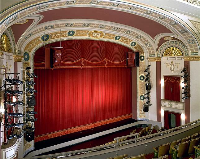
Performing Arts Theater at all levels, city, community, or dinner theater, as well as schools, clubs or place of worship, can enhance performances with smart sound design. Organize a complete sound plot for a show to execute sound cues. Use the Automator to create precisely timed soundscapes of multiple simultantous sounds. Automatically generate detailed sound design reports, organized by Act and Scene, to view on screen or to print and review at production planning meetings.
Synchronize Audio, Video, and DMX Lighting - Sound Mill , Video Mill , and FreeStyler DMX Portal can communicate over a network (wired or wireless) to sync media playback. Utilize an HD stage screen (or multiple screens) to create dazzling video backdrops. Initiate intricate DMX lighting sequences with split-second timing. And it can all be remotely coordinated with a single click using our automation tools.
Even third party mechanical devices can be controlled if they have a way to accept software commands.
Automate Announcements with Music

- Insert Announcements - After every N number of music tracks play. You pick the number.
- Interval Announcements - After every N number of minutes passes. You pick the time Interval.
- Group Announcements - For the automated announcements above, you can can play a group of messages (any number) every time they play. Example, if you have 8 messages, play 2 every time announcements are triggered. Messages will automatically cycle.
- Scheduled Announcements - Set specific messages to play at a specific time-of-day (ex. Store closing in 10 minutes).
- Change Announcement Sets - You can automate running different message sets at different times of day.
- Adhoc Announcements - Manually play one or multiple messages at any time with a single click whenever needed.
- Auto-Fading - Fade music in/out when announcements play for a smooth transition.
- Use Different Volumes for Announcements and Music - It's easy. Just set the percentage of full volume for each type.
- Add Silence Buffers - Set a silence time buffer between announcements and music to avoid abrupt transitions.
Play Audio in Multiple Zones Simultaneously
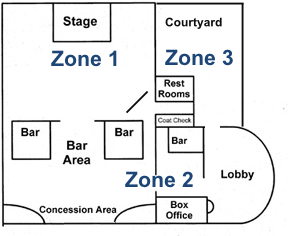
Pipe different playlists to different zones simultaneously (example: main stage, lobby, courtyard). Each zone can have its own audio programming if needed. You can use a multi-output soundcard or use a USB hub with inexpensive USB external sound card audio adapters for under $10 each.
- Time playlists to start and stop at a time of day using the Scheduler.
- Pause all programming with one click to make a microphone announcement. Then resume all with one click.
- Bells and chimes in multiple rooms can be automated to mark the beginning and end of periods at various times of day.
 See how Capital City Civic Center uses
Sound Mill
to centrally control music playlists to multiple meeting/dining rooms.
Each event room plays its own playlist requested by the customer.
See how Capital City Civic Center uses
Sound Mill
to centrally control music playlists to multiple meeting/dining rooms.
Each event room plays its own playlist requested by the customer.
Stand-up Performers with Handheld Remote Control

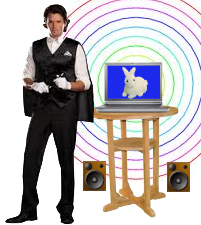 See how Mark Angelo, owner of Comedy In High Definition™, uses
Sound Mill
with a concealed remote control for his Comedy/Juggling act.
See how Mark Angelo, owner of Comedy In High Definition™, uses
Sound Mill
with a concealed remote control for his Comedy/Juggling act.

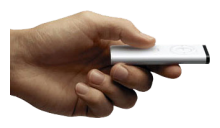 Accompany your act or presentation with a music track and surprise sound effects at precisely timed moments. Hide your remote in your pocket, out of sight for stealth operation. Hey, it's magic. Display large font text or use images to indicate your position within the sound cues list.
Try 3 cues visible at once: The current playing cue (highlighted in reverse video) plus the previous and next cues.
Volume Fades, bump volume up/down and mute via remote. Forward and back buttons allow you to quickly scroll through the cues. Tie ad-hoc sounds (ex an applause sound) to one or two buttons for on demand play.
Accompany your act or presentation with a music track and surprise sound effects at precisely timed moments. Hide your remote in your pocket, out of sight for stealth operation. Hey, it's magic. Display large font text or use images to indicate your position within the sound cues list.
Try 3 cues visible at once: The current playing cue (highlighted in reverse video) plus the previous and next cues.
Volume Fades, bump volume up/down and mute via remote. Forward and back buttons allow you to quickly scroll through the cues. Tie ad-hoc sounds (ex an applause sound) to one or two buttons for on demand play.
Lots more function is available -- for more detail see the Operating with a Remote Control Device section of the
Sound Mill
User's Guide.
Haunted Mansion and Amusement Attractions

 See how
Sound Mill
is used by
the HauntedWeb of Horrors in Memphis
, the premier haunted house attraction in Memphis Tennessee.
See how
Sound Mill
is used by
the HauntedWeb of Horrors in Memphis
, the premier haunted house attraction in Memphis Tennessee.
You can even setup an Audio Kiosk and let venue attendees select and play whatever they want.
Audio file formats supported

Sound Mill will play virtually any standard format audio file. Record your own, download thousands from the Web ( Google "sound effects download"), or visit your local library and ask about sound effects CD collections.
- Standard Supported Formats - Sound Mill supports these formats out-of-the-box: WAV, MP3, WMA, MIDI (MID), AU, AIFF (AIF), M4A, MP4, WMV, MOV, AVI and more... -- Virtually any size file. For video formats, only the audio portion will play, video is ignored. Generally, if Windows Media Player can play the format, it should work with Sound Mill .
- Add More Formats with a Codec - By installing the excellent and Free KLite Codec package , you can extend the number of formats supported dramatically including popular formats like FLAC, OGG, AAC and more. Or use your own favorite audio codec.
- M3U and WPL Music Playlist Import - Take advantage of pre-existing playlists. (WPL, Windows Media Player playlists)
- Web Based Media - The media file can exist on your local computer, network or reside on the Web (http and https web links).
- CDrom Disks - Supports DVD/CD Player Audio CDs.
Key Operational Features
Tip - View the online demos to get a preliminary technology overview. Nothing to install. Just click and view.
- Touch Screen Enabled - The Easy Player interface is fully touch screen enabled (Ultimate edition). And Basic edition users can transform the performance interface into a Touch Enabled interface in 60 seconds. (see screen shot )
- Wireless Bluetooth Speakers supported - Fully tested with wireless Bluetooth speaker devices as well as wire connected speaker systems.
- High performance - Takes advantage of multi-threading on multi-core CPU systems. Runs in 64-bit Mode on 64-bit Operating Systems.
- System Integration or control by Smart Phone - Integrate with other automation apps (Windows or non-Windows based) or send commands from your smart phone.
- Use with other audio programs - Use Sound Mill and other audio software (ex. WMP) simultaneously.
- Automation Manager - Use the Automator to build and run automation Scripts to play sequences of sounds sequentially or at timed intervals.
- Now Playing Screen - Automator screen for audience viewing on large displays. Shows current playlist item Mp3 (ID3) tags (Song Name, Artist, Album and Artwork). Highly customizable.
- Easy Player - The Easy Player facilitates operation by wireless remote control devices and touch screen. And provides a simple, intuitive player user interface (UI) for untrained operators.
- Business Announcements - Easily automate the insertion of your business or organization Announcements (recorded messages) into music programming.
- Eight(8) Band Equalizer - Equalizer enhances audio frequency bands to highlight voice or an instrument. Equalizer Band Center Frequencies are adjustable
- DSP Effects - Equalize, Reverb, Volume Wave, Fuzz, Echo, and Pitch Shifter. Create as many customized DSP Effects as you want. Multiple Effects can be combined into DSP Chains for composite effect sound.
- IPC (Inter-Process Communications) Integration - Send and receive automation commands from Sound Mill to Sound Mill (or Video Mill ). Enables syncronized, large scale media applications across multiple computers. Provides split second timed automation of audio and video programming. The programs can reside on the same computer or separate computers on a wired or wireless network.
- Trigger automation from a third party tool - You can kick-off automation from any third party tool that can execute Windows command line tools. (via free SendTo_UDP Tool based on IPC Comms above)
- Control Over a Network - Via the separate Remote Media Manager , an untrained user (or kiosk user) can run basic operations of Sound Mill over a local computer network (wireless or wired). RMM also has an admin user interface to manage Sound Mill running on remote computers.
- Scheduler - Schedule automation Scripts to start at a given time of day for pre-show and intermission music and announcements.
- Flexible date scheduling - Create schedules to run by date: daily, weekly by day of week, monthly by date, and limited to a date range and more.
- Playlist Logs - A daily log of all audio played is saved as a file (CSV format). View with Notepad or import into your business reports tool.
- Wireless Remote Control Devices - Control sound cues or music with a pocket remote device at distances up to 130 feet. Most standard presentation remotes are supported, costing a little as $20. (control from SoundList Editor or Easy Player window)
- Audio Kiosk - Let customers or venue visitors interact with your sound design via a Kiosk. Visual design capabilities for creating the Kiosk are highly flexible. (see Easy Player feature)
- Multiple Zone Output - Simultaneously play different audio and music programs on Multi-Zone Outputs Systems (ex. lobby PA, stage tower speakers, courtyard). (WAV, MP3, WMA, AIFF supported for the Outputs feature)
- Run External Programs - Run External Programs (ex. .bat, .exe, etc) and pass variables. Useful to coordinate/operate other show devices (ex. lighting systems, etc).
- Manual play mode - Oversized buttons for play, stop, pause and resume. Adjust volume, pan left/right.
- Start and Stop Play Markers - Markers allow you to start and/or end play at any position in the audio file.
- Music Playlist Shuffle - Tracks can be automatically shuffled to a random order each time a playlist is run.
- Music Playlist Cross-Fade - Simply by setting Cross-Fade Mode, you can make music Playlist tracks fade into each other. Current track fades-out while the next track fades-in.
- Auto-Fade In/Out on Play/Stop/Pause/Resume - With one click you can turn on/off volume fading for play actions. Just set the desired fade duration (in seconds) and fades are performed automatically. No more jarring volume spikes or drops on high volume systems. Play/Stop/Pause/Resume can each have their own unique fade duration.
- Fade-In and Fade-Out Marker - Fade markers allow you to fade the volume in or out at any position in the audio file. You can set the fade duration (faster or slower fade) and the target volume level to which it will fade to.
- Quick Markers - This is a Mass Update feature to perform edit operations on a selected set of Sound Items with one click. Includes: Add Fade-In and Fade-Out Markers; Snap-to Marker Position to the Left or Right Guide position; and Delete All Fade markers.
- Auto Volume and Pan - Fade or gain volume at a set duration. Pan left or right at a set duration. Loop back in the other direction automatically.
- Preemptive play mode - Play causes all playing sounds to suspend while a preemptive sound plays. (useful for injecting timed announcements into a music program).
- Loop play - Play one sound in a continuous loop. For example, put a short clip of rain falling into a loop, then play thunder claps randomly.
- Delay - Set a time to delay before and/or after playing a sound (Pre/Post Delay). Useful for separating sounds in automation Scripts.
- Multi-Play - Set the number of times to repeat a sound.
- Dark Application Skin - Prevent eye strain in a darkened theater or venue by using a Windows High Contrast Theme. (see screen shots page)
- More... - This is the short list of features. Browse the Help document for a complete tour.
Key Editing Features

- Script Editor - The Script Editor provides a fully graphical user interface for editing automation Scripts.
- Sorting/Merging - Sort your sounds by Name, Category or Act/Scene. Merge lists together with one click.
- Drag and drop - Use Windows Explorer or other file manger to drag and drop audio files into your Sound List. Also, drop folders of files or M3U Playlist files.
- Copy and Paste Editing - You can copy a sound with all of its configurations and paste as a new sound. Move sounds up or down in sequence with one click.
- Mass Updates - You can make the same attribute change to many sound cues at once -- A huge time saver with a large list of sound cues. Changes can be one attribute, multiple or all attributes.
- Find - Advanced searching on various sound cue attributes (name, description, audio filename).
- Default Values - Save default values used when creating new Sound Items.
- View/print reports - View a report (a.k.a. sound plot) showing the list of sounds and configurations applied to each sound. You can save as a file and print the report. Set the level of information and detail to include.
- List Sorting - Sort your list by sound name or by act/scene. Auto number the list.
- Repair - It is common to move audio files to new folders. The repair feature can reset audio file paths when files get moved.
- Password Protection - Password protect your work from tampering or unauthorized use.