
 Installation and Troubleshooting : Knowledge Base
 Contents
 Language
 Breakthru Software Home
Program Activation
 Page Bottom
Lost or Missing Activation Code
- I did not receive an order confirmation email. - You should get an order confirmation email within 1-10 minutes after purchase. If the email does not arrive: 1) Check your mail Spam folder in case your mail server mistakes it as spam. 2) Refresh your mail list. After 10 minutes, if it has not arrived, use one of the methods in the next bullet to get your code.
- I misplaced my activation code. - For immediate retrieval go to the Retrieve Activation Code self service web page (automated). Or Contact us and we will email it to you. Note the 'Hours of Operation' on the Contact page.
 To Page Top
How to Activate
After installation, you need to Activate the program with the activation code to unlock all the features. Activation associates your program license to a specific computer. The purchase terms allow for one computer per license.
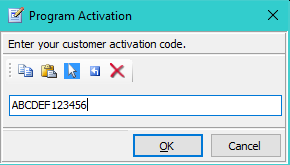
Start the program and go to Help > Activate. Copy the Activation Code from your order confirmation email and paste it into the activation dialog, then press OK. Please be patient. Activation usually completes in less than 10 seconds, but can take up to 60 seconds. When activation succeeds, close the program and restart it. Once activated, your Activation Code cannot be used to activate the program on any other computer.
Use the Copy and Paste toolbar buttons or keyboard short cuts ( Ctrl+C for Copy; Ctrl+V for Paste).
Activation Requires Internet Access
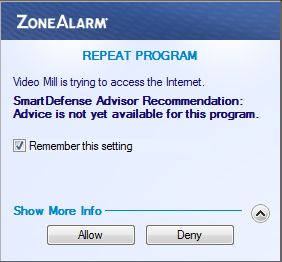
The program will attempt to access the Internet during Activation. You computer's firewall may popup a message (Figure 2) asking if the program may access the Internet. You MUST ALLOW this access.
If Activation Fails
First, don't panic. The standard activation method works fine for most of our customers, but on rare occasions a problem may occur. It is usually due to one of the issues listed below. Do not hesitate to contact us if you do not succeed with Activation.
Activation error messages
If you contact support, please include any error messages you receive. Check the program Session Log for error messages (Help > Session Log). If you get a pop-up error message, you can copy the pop-up to the Windows Clipboard by clicking on the pop-up to make it the active window then click Alt+PrtScn keyboard keys.
Key Reuse Denied
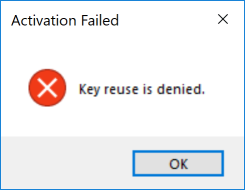
If you see this "Key Reuse Denied", it is because the Activation code you are trying to use is linked to another computer. If you have more than one license, you need to keep track of which Activation code is linked to which computer. The program Help > About dialog will list the activation code that is in use.
Common Reasons For Activation Failure
- Computer Date/Time Incorrect - Your computer System Date/Time needs to be set to the current date/time. If it is not, you will likely get a failure (ex. invalid request, Error Code 7 or other failure code).
- No active Internet connection - You will typically get a Timed out error message in this case. Try opening any Web page with your browser to test your connection. If you can't open a Web page, your connection to the Web may be down. Try rebooting the computer.
- Firewall block - You must 'permit/allow' the program to communicate through your firewall once for activation. If your firewall does not prompt you for permission, it is possible that your firewall is set to ignore program requests for access to the Internet (outbound or inbound). Consult you firewall software Help to determine application firewall settings. Or simply disable your firewall program during activation, then re-enable it.
- Network error - If you get an error message like "The remote name could not be resolved: 'www.breakthrusoftware.com' ". This is likely a confused network program stack issue. Rebooting your computer should fix the problem. Or you can recycle ( disable, then re-enable) your network card in the Start -- Control Panel -- Network Connections to refresh the network stack.
- Our Web server offline - On rare occasions, our Website maybe be offline due to server maintenance by our Website hosting provider. This will likely produce a Timed out or Service Unavailable message. So you may want to wait a while (10-20 minutes or so) then retry. Try loading our Website home page with your browser to see if our Web server responds. If our site does not load but other Web sites do, then our server is likely down for maintenance. Please report the server outage to Support and we will look into it.
- Activation on Wrong Computer - Error message: Program Id invalid. Once you activate sucessfully, your activation code is linked to the computer on which it is activated. Subsequent attempts to activate on another computer with your activation code will fail. Changing any of the major hardware components of the computer may also cause this verification failure. If your intent is to transfer the program license to another computer, you need to follow the Program License Transfer Procedure.
- Blocked by Proxy Server - Some businesses or institutional settings (ex. universities) may use a Proxy Server between user client computers and the Internet. Certian proxy configurations can prevent the activation service from working. A common error message for this issue is HTTP status 417: Expectation Failed. The easiest solution is to take the computer to a building that does not use a proxy server (coffee shop, etc). Or ask your network administrator if there is a way to bypass the proxy server.
- Using TeamViewer (or similar remote access tool) - If you are running the program remotely using a tool like TeamViewer, activation may fail. These tools manipulate IP traffic and our program activation uses IP protocol to transfer the activation request/response. You may need to have someone who is located at the physical computer do the activation.
- Cloned Hard Drives - If you copied a Cloned Hard Drive from another computer and our program was installed on that computer, you may experience an activation issue (Typically Error Code 412). Contact support for special instructions if activation fails.
Activation and Your Privacy
Activation passes your Activation Code and program identifier to our Web server. No identifiable information about you or your computer is transmitted in this process.
