
 Sound Mill X3 : User's Guide
 Contents
 Language
 Product Home
Scheduler
 Page Bottom
Locator: Automator > Scheduler .
Overview
The
Scheduler
provides a way to run schedule Scripts at a specified time of day and on configured dates. One primary use is for
mixing announcements with a music programming. This is useful for pre-show and intermission music programing as well as businesses like stores or public venues that need to interrupt programming to make announcements at scheduled times. The music (or whatever is playing) is paused until the announcement finishes. You can add silence before and after the announcement to give it separation. By setting different volume levels on the Music and announcement Sound Items, you can make the announcements louder if desired.
Scheduler Plan
contains a list of all the Scripts and Steps scheduled to run at a given time. The list will change over time.
Announcement examples: "Show begins in 10 minutes. Please take you seats." or "Attention customers, blue light special on isle five.". Real announcements will obviously be longer but you get the idea.
 To Page Top
Scheduler Behavior
Important Rules
- When you start the Scheduler, a Schedule Plan is created that lists all the Scripts and Steps that will run based on their schedule times.
- Only Scripts that have their Schedule Enabled will be added to the Schedule Plan. (see Figure 1, Schedule Enable checkbox)
- Script Steps that are scheduled must reside in a Script that is scheduled. (Or within a script that is spawned by a RunScript Step.)
- If a Scripts' schedule start time is earlier than the time that the scheduler is started, it will NOT be added to the Schedule Plan. Example: If the script is scheduled to run at 8AM and you start the scheduler at 9AM, the script will not run.
- You can ensure that a script will always run anytime the scheduler is started by setting its schedule Time Type to Time Period. Then set the Period Range to "24 Hours".
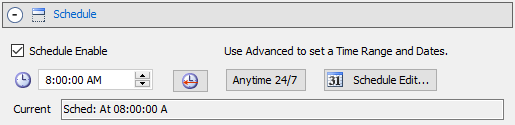
General Behavior
- The Scheduler must be in 'Started' state (and not Paused ) for scheduled Scripts to run at its scheduled time.
- When the Scheduler is 'Started' all Scripts scheduled to run at the current time (ie now) or at a future time are added to the Scheduler Plan.
- Scheduled Steps are not put on the Scheduler Plan until the Script that contains the Steps is run. Scheduled Steps can ONLY be run by the Scheduler and are ignored when a Script is run manually.
- The Scheduler Plan is cleared when the Scheduler is 'Stopped'.
- When the Scheduler is 'Paused', any Offset timed Steps that time out (Offset expires) are lost (not executed) and unpredictable results are possible.
- If the Scheduler is running, any edits to Scripts or Sound Items, and any program changes made in the Options dialog will not take effect in the Scheduler until it is stopped and restarted.
Scheduler Behavior with Time Periods
- If you start the Scheduler before the time range Start Time, the scheduled object will start when the Start Time is reached.
- If the Scheduler is started at anytime within the time range (Start to End Time), the scheduled object will start immediately.
- If the Scheduler is started after the time range End Time, the object will NOT get scheduled into the schedule plan.
Scheduler menu
- View Scheduler Plan - View all Scripts scheduled to run in the Scheduler.
- Scheduler Plan: Include Expired Items - When checked, the Scheduler Plan will show items that have Enabled Schedules but were not executed due to a schedule Time Miss (its schedule time has passed by (expired)).
- View Scheduler Log - Views Scheduler Log which shows Scripts that have run and any related error messages.
- Reset Scheduler Log - Resets the Scheduler log clearing all old messages.
- Stop Scheduler after current play - Scheduler stops after the current playing sound finishes. Allows for a more graceful way to shutdown the Scheduler.
- Prompt Warning on Start/Stop - Causes an OK/Cancel prompt warning before starting and stopping the scheduler.
- Refresh Scheduler - Syncs the Scheduler with current Sound List. Sometimes required if the scheduler is running when you are making Sound List edits.
- View Scheduler Report - Lists all items (Scripts and Steps )that have schedules applied with the detail of the schedule. It will list the date portion of the schedule if date scheduling is enabled. You can opt to include/exclude the date portion of the schedule in the options dialog (see Show date portion of schedule summary .
- Start - Starts the Scheduler. Builds a Schedule Plan of all Scripts that have a Schedule Time enabled (except Scripts scheduled in the past which are ignored). When the time of day reaches a Script's scheduled time, the Script starts running and its Steps are executed. If a Script Step has a Schedule Time enabled, it is added to the Schedule Plan.
- Stop - Stops the Scheduler. Schedule Plan is cleared. Any executing Script Steps spawned by the Scheduler are terminated. Playing Sound Items will Fade-Out if Auto-Fade-Out option is in use.
- Pause - Pauses the Scheduler. All Scripts running in the Scheduler are paused.
- Resume - Resumes the Scheduler. All paused Scripts in the Scheduler are resumed.
- Restart - Performs Scheduler Stop (if currently running), then Start in one click. This will rebuild the Scheduler Plan to pick up recent edits or rebuild the daily plan.
- Halt - Halts the Scheduler. Schedule Plan is cleared. Any executing Script Steps spawned by the Scheduler are terminated immediately.
- Clear Announcements (All) - Clears all current running Announcements and all Announcements scheduled to run at a later time from the Scheduler. Useful if you want to manually stop any programmed announcements from playing but leave a music playlist running. See the Clear Announcements section for more details.
- Clear Announcements (Running Only) - Clears current running Announcements ONLY from the Scheduler. Excludes any later scheduled announcements already in the scheduled list. This is a good option for cases when you want to stop announcements from playing at the moment by keep announcements that are scheduled for later in the day. See the Clear Announcements section for more details.
- Add Selected Script to Scheduler - Adds the selected Script to the running Scheduler. If the Script is scheduled, it will be scheduled for the designated time. If the Script is not scheduled, it will run immediately. Ignored if the Scheduler is not currently running. Used in conjunction with Clear Announcements, this is a good way to manually swap Announcement sets in and out of the Scheduler.
-
Test Schedule Dates
- Test Selected Script - Runs a simulation to test future dates against the Schedule criteria of the selected Script. Each date that satisfies the Schedule criteria is listed (ie dates that the Script will run). Test dates start with today's date and run for the current test Duration (default is 180 days).
- Set Test Duration - Allows you to change the number of dates that are tested.
Scheduler tool bar
- Scheduler tool bar - Buttons (Figure 2, from left to right): Scheduler Start, Stop, Pause, Resume, View Scheduler Plan.
Also see the Docking Tool bars section.

Scheduler Diagnosis
If schedule is not executing as expected or you want to confirm that it is working as designed, check these Information Sources for messages about what got scheduled, what missed the schedule, and what steps were executed by the scheduler.
Key questions
- When the Scheduler is started, did all scripts get added to the Scheduler Plan as expected?
- When a scheduled Script executes to all the steps execute as expected. If any Steps contained in the Script are also scheduled, do they get added to the Scheduler Plan?
- If a Scripts or Steps does not get added to the Scheduler Plan, then why didn't it? Did a check fail for Date or Time?
Information Sources
- Scheduler Report - This lists ALL Scripts and Steps that contain time/date schedules. If you want to see the Date portion of the schedules, then check Show date portion of schedule summary in the Automation Options.
- Scheduler Plan - When the Scheduler is started, any Scripts that passed the schedule test will be listed in the Plan. If any scheduled Script contains scheduled Steps, the Steps will be added to the Plan at the time the Script is executed.
- Scheduler Log - Lists times that the Scheduler was started and stopped. When the Scheduler is started, this log will list any Scripts that contain schedules but failed to pass the test to get scheduled (ie time or date failed to pass the test).
- Automator Log - This log contains entries for all Scripts and Steps that were executed.
- Session Log - This log contains error messages that may indicate why a Scripts or Steps failed to execute.
