
 Tempo Game Clock : User's Guide
 Contents
 Language
 Product Home
View Menu
 Page Bottom
Tip on Sizing Game Displays
This is a consideration for those who are displaying Game Displays on a secondary digital display (ex television, video projector, etc) for audience viewing.
The text panels on the Game Display will resize automatically to accomodate a larger number. For example, when your score changes from a single digit number to double digits (ie "9" to "10"), the score panel widens for the double digit number. And the Game Display window will expand as necessary so that all text panels are viewable.
So it's a good practice to pre-size your Game Display windows prior to beginning play so that their size remains constant as scores and other text change.
To do this, select Player #1 and set Scores, Penalty, Passes, and Moves to the maximum values you would expect for game. For example, if Scores don't exceed double digits, set the Score to "44". Then resize all other Player Game Displays to the same size as Player #1 using
Set All Sizes to Player 1 Size
below. Then position them on your screen as desired. The program will remember the Game Display sizes and positions for subsequent sessions. Also note that if you are using proportional fonts on the Game Display, a "4" is wider than a "1". In general, the widest number in most proportional fonts is the number 4.
There are
Set to Value
menu items in the Selected Player Menu for Passes and Moves. And you can quick set the score via the Score Adjust toolstrip.
 To Page Top
Refresh
Refreshes the Game Displays. Occasionally required after some Options changes or game customizations.
Show a Player Game Display
Will show one player's game display. You are prompted to pick the player.
Hide a Player Game Display
Will hide one player's game display. You are prompted to pick the player.
Auto-Size All Game Displays
This will resize all game displays to fit all visible game display features. Useful after resetting Layout Features Visibility on the Options dialog.
Set All Sizes to Player 1 Size
First, resize Player 1's game display to a desired size using the mouse. Then click this menu item to size all other game displays to the same size as Player 1's game display. Useful to set all game displays to a uniform size.
Auto Position Game Displays
These menu items allow you to position (Tile, Cascade and Stack) all Game Displays automatically relative to the location of Player 1's Game Display. First, move Player 1's game display to a desired location before using these operations.
Tile at Player 1 Location
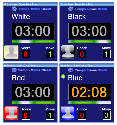
Game Displays are positioned on the screen in rows from left to right (see Figure 1). The number of Game Displays per row and spacing between Game Displays is set in the Options - Game Display dialog.
Cascade at Player 1 Location
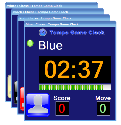
Game Display are positioned on the screen diagonally in the selected direction (see Figure 2). Four Cascade directions are possible. The horizontal and vertical offset of each sequential Game Displays is set in the Options - Game Display dialog.
Stack at Player 1 Location
Stacks the game displays at the location of Player 1's game display. Stacking puts the game displays one on top of the other so that only one game clock is visible at a time during game play. When a player's clock starts, his game display is brought to the top of the stack. Useful for small displays like laptop computers.
Move Player 1 to Screen Top, Left
Moves Player 1's Game Display to the top, left corner of the computer screen (horizontal=0, vertical=0). If you are currently Extending the Windows Desktop across two displays, it will be moved to the top, left corner of the Primary display screen.
Order Game Displays
Orders Game Displays in Z-Order (Front to Back) on the display screen starting at Player 1 continuing in player sequence. Useful when Game Displays overlap on the screen.
- Player Order - Player 1 will be on top when Game Displays overlap.
- Reverse Order - The last Player will be on top when Game Displays overlap.
Toggle Game Display Title Bars
Toggles between Show and Hide of the Game Display Title Bars. To resize and position the Game Displays with the mouse, you will need to Show Title Bars. Hiding Title Bars is useful during a show performance when projecting Game Displays on a TV monitor.
Scale Size of Game Display
Sets a size scaling factor for the Game Display to increase or decrease the size. Normal size sets a factor of 100(%). 50(%) is half of normal size. Custom size allows you to try smaller or larger scaling. 125(%) is 25% larger than normal size. Zooming changes the relative sizes of the fonts and display boxes. It is generally best to set Font sizes in the Options. But when that does not produce the desired result you might try this scaling. Depending on your screen resolution the Game Display may have to be zoomed to fit the screen.
