Tempo Game Clock : User's Guide
 Contents
 Language
 Product Home
Selected Player Controls Panel
 Page Bottom
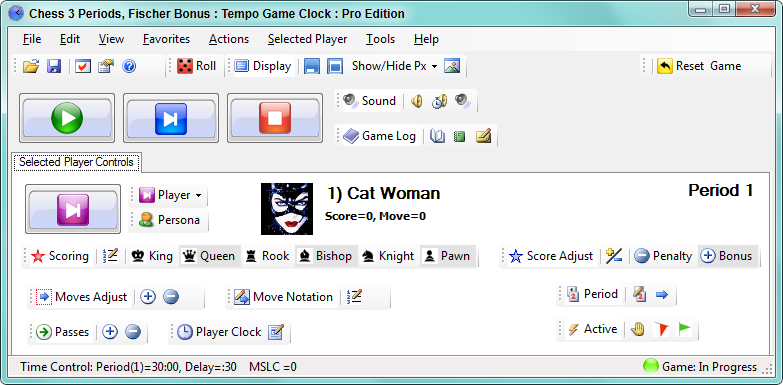
Any button clicked on the Selected Player Controls panel (Figure 2) will apply to the current selected player. The name and avatar image of the current selected player is displayed to the right of the Select player button. Most of these toolstrip operations automatically add an entry to the game log. The current selected player is not necessarily the same player whose clock is ticking. This allows you to update scores and make adjustments for a player independent of whose turn it is.
Select Player button
The controls on the Select Player Controls panel operate independently of the clocks. So you can be modifying the score (or other values) for player A, even when player B is the active player (ie while it is player B's turn and his/her clock is running).
- Select Current Player - Select a player by clicking the Select Next Player button or the Select Player pulldown. Any buttons clicked on the Player Controls panel apply to the current selected player. The following information is displayed to the right of the Select Player button: current selected player number, player screen name and persona avatar image.
- Change Persona button allows you to pick a persona for the selected player.
 Player Select buttons
  To Page Top
Scoring Toolstrip
The Scoring Toolstrip will vary by game type. Every game has its own unique scores and related point values. The toolstrip has the following functions:
- Edit - Edits a players Scoring list of selected player. Used for remove an existing score.
- Scores buttons - To register scores of selected player , click one of the score buttons on the Scoring toolstrip. The Moves Since Last Capture (MSLC) indicator is set to zero when a score is registered.
 Scoring toolstrip (Chess example. Scores buttons vary by game type)
 Score Adjust Toolstrip
You can edit Penalty and Bonus point values which appear on the
Score Adjust
toolstrip by
Edit -- Game Type Attributes -- Penalty and Bonus Points
. Default values are set for Penalty (-1) and Bonus (1). Some standard game types have predefined Penalty and Bonus Points values. See more details in the Game Type Attributes section.
- Add or Subtract Points - The Plus-Minus button provides a popup dialog to enter the number of points to Add or Subtract to/from the player's total score. To Subtract enter a negative number.
- Penalty - Adds one Penalty to the player's Penalty total and subtracts from the player's score. A Penalty point value is generally set to a negative value (ex -1) but may be more than one point (ex -2,-3, etc).
- Bonus - Adds one Bonus to the player's Bonus total and adds to the player's score. A Bonus point value is generally set to a positive value (ex 1) but may be more than one point (ex 2,3, etc).
 Score Adjust toolstrip
Moves Adjust Toolstrip
The Moves Adjust Toolstrip has the following functions:
- Add or Subtract - Increases (or decreases) the number of moves for of selected player. Moves are counted automatically when clicking the Select Next Player button, but this is provided in case you need to manually adjust the number.
 Moves Adjust Toolstrip
 Move Notation Toolstrip
- Move Notation List Editor - Allows the selected player to edit the list of all her moves. Click Add to add a new move to the bottom of the list. Insert inserts a new move at the selected position. Select an existing move with the mouse. Remove removes the selected item. Enter text into the Replace Text input field then click the Replace Text button to replace the text of the selected item. Players typically scribe move notation on a notepad and enter it at the end of the game. Move notation is stored with the saved game as a permanent record of the game. Moves of both players are shown in the Game Stats. The green up and down arrows will move a selected item.
 Move Notation toolstrip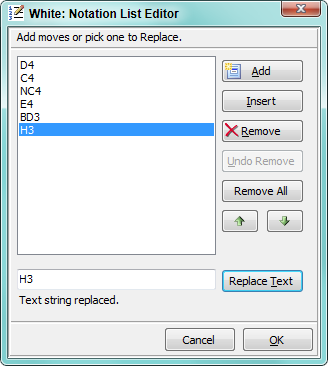
About Chess Move Notation
If you are not familiar with chess move notation, one of the most popular forms of notation is the Algebraic System. Serious players usually record their games for later study and learning. It is required for tournament play.
Period Toolstrip
The Period Toolstrip provides period control for the current Time Control. The details of the current Time Control including all periods can be listed by View -- Game Properties .
- Period Edit Provides a dialog to set the time length of the current period, delay and bonus time and other period attributes. After making changes, click Reset on the Game toolstrip to reset the clocks.
- Next Period Advances to the next period. Remaining time in the current period may be carried forward for each player if indicated on the Time Control.
 Period toolstrip
Clock Adjust
You can adjust a selected player's clock AFTER a game reset to allow a less experienced player more time
(sometimes called a time handicap). Or use this if you need to adjust a player's
clock for lost time . For example, if a player leaves the room for a break and forgets to stop his clock, you may restore lost time.
 Clock Adjust Toolstrip
Passes Toolstrip
If the game supports passes, you can
Add
or
Subtract
from the selected players Pass total points.
Passes are often used in word games allowing a player to pass on a number of questions to avoid a penalty. See Game Type settings for how to enable passes. Note that a Pass may have a nominal value greater than one point. For example, if one Pass has a point value of 5 and you add 2 Passes for the player, then 10 total Pass points are added.
 Passes Toolstrip
Active Toolstrip
The Active Toolstrip has the following functions:
- Player accepts draw - Selected player is accepts a drawn game (deactivated from the game but does not accept defeat).
- Player eliminated - Selected player is eliminated (deactivated) from the game. Player resigns and accepts defeat.
- Player reactivated - Selected player rejoins game in progress (reactivated).
 Events Toolstrip