
 Video Mill : User's Guide
 Contents
 Language
 Product Home
View menu
 Page Bottom
View menu
Menu Locator: Media List Editor > View .
Menu Items
- Open All Controls Panels - Opens all Controls Panels.
- Close All Controls Panels - Closes all Controls Panels.
- Scroll To Top - Scrolls the user interface to the top control panel section.
- Scroll To Bottom - Scrolls the user interface to the bottom control panel section.
- Resize Program Window - Reset the Media List Editor window to specific size in pixels, via pop-up dialog.
-
Tool Bars
- Show or Hide Tool Bars - You are prompted to select which tool bars you want to Show or Hide.
-
Scale Tool Bars Size You can scale the size of individual tool bars if desired. This may be useful during performances if you want over-sized control buttons which are easier to target with a mouse. Or if you have a touch screen monitor, you can scale the buttons large enough so they can be easily pushed with your finger tip. Tool Bar size is restored from session to session.
- Select Tool bars to Scale - Select one or more tool bars to scale in size. The selected tool bars will be scaled in size by the current Scale Factor. Remember to set Scale Factor first before using this menu item.
- Set Tool bar Scale Factor Sets the current Scale Factor used for any subsequent scaling. The number is basically a multiplier of the standard tool bar size. (ex. 1.5 = 50% bigger than standard size, 2.0 = double sized, 3.0 = triple sized etc.) Changing the scale factor does not change the size of tool bars that have already been scaled. So you can have tool bars with different scaling size.
- Reset Tool bars to Normal Size - Select one or more tool bars to reset size to standard tool bar button size.
- Reset Tool Bars to Default Settings - Moves the tool bars to original default postions at the top of the program window. Requires a program restart to take effect. Sometimes required when installing a new release that changes the tool bars buttons. Or if a tool bar mysteriously disappears after dragging it to a new location, try clicking this menu item. Keyboard shortcut: Ctrl + Alt + R.
- Arrange Tool Bars - Locates tool bars to factory preset locations arranged 4 tool bars per row.
- Menu Bar - Toggle Show/Hide - Toggles between a show/hide the menu bar. If you hide it, you'll need the keyboard shortcut (Ctrl + Alt + M) to restore it.
- Toggle View of Second Time Postion Readout - Toggles (show/hide) of the second play position readout above the play position trackbar. When showing, it allows for view of time remaining and forward play position. See the Play Position Controls panel.
 To Page Top
Open Control Panels Toolbar
This toolbar allows you to open and close the individual control sections of the program. Closing sections saves space.
Operation
- Click to Open - Opens the control section associated with the clicked button and brings it into view for editing.
- Double-Click to Close - Closes the control section associated with the clicked button.
- Open Control Panels Toolbar - Buttons (Figure 1, from left to right): All Control Panels, Play Position, Play Controls, Fader Bar, Start-At/End-At / Fades, Volume, Audio Balance, Speed, Descriptors, Media Screen Dimensions, Video Geometry, Video Filters, Play Modifiers, Screen Layout.

Figure 1. Open Control Panels Toolbar
Configuring the Program for Touch Screen Use
Performers that prefer Touch Screen control can configure the program for a Touch Screen device. The trick is to scale tool bars size large enough so that the buttons are a comfortable size for finger push. And setting a large sized List Font and Menu Font for list item selection and menu navigation.
Steps to configure for Touch Screen
- Hide any tool bars not needed for performance. See Show/Hide tool bars details above.
- Scale the size of the tool bars you want to use to a comfortable size for finger button push. Typically, 2X to 3X scaling will be about right, but scale them to any size you prefer. See tool bars Scaling details above.
- Increase the List Item size so that the list items are large enough for finger touch selection. Do this by selecting a large List Font in the Program Options dialog.
- Show the List Item Selection tool bar if you want list navigation buttons for Up, Down, Page Up, Page Down .
- You can also gain touch access to the main menu items. For example, you may want to be able to change Media Lists during the performance by using the Recent Files menu item. Do this by selecting a large Menu Font in the Program Options dialog.
Example
Figure 2 one shows a Touch Screen enabled interface. Tool bars are Scaled by Scale Factor 3.0 (but you can set to any size you prefer). The List font is set to font size 28.
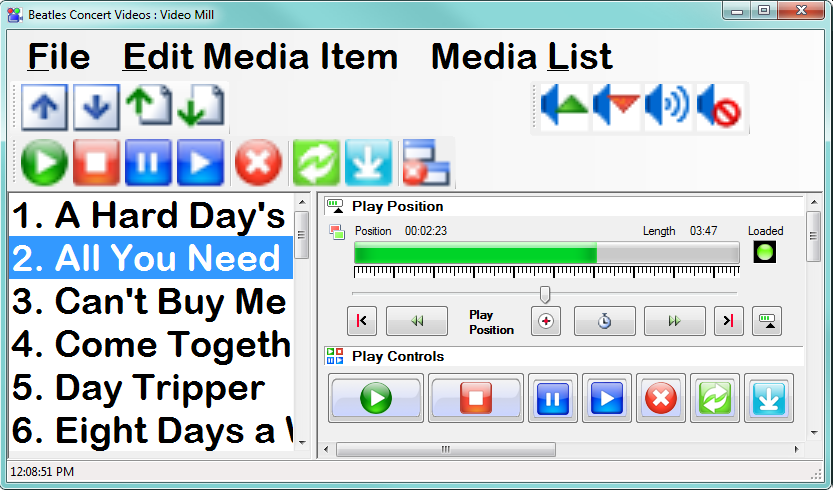
Figure 2. Media List Enabled for Touch Screen
