Video Mill : User's Guide
 Contents
 Language
 Product Home
Skew Effect
 Page Bottom
Overview
 Skew Effect (Skew Effect)
bends the sides of the video at an angle (in degrees), keeping the sides parallel.
You can Skew along either the X or Y axis or both. Using different values for Target Values X and Y will have the affect of stretching or squashing the image.
There are From and To values for both Horizontal and Vertical directions.
Skew Effect (Skew Effect)
bends the sides of the video at an angle (in degrees), keeping the sides parallel.
You can Skew along either the X or Y axis or both. Using different values for Target Values X and Y will have the affect of stretching or squashing the image.
There are From and To values for both Horizontal and Vertical directions.
Settings
- Name - A short name to that will identify the effect's purpose.
- From - Starting value for the effect. The effect animation continues to the To value.
- To - Ending value for the effect.
- Apply a From Value - When checked, the effect uses the From value. If not checked, the effect will begin at the current value.
See the Timing section for details on timing the animation of the effect. See the Motion Behavior section for details on modifying the default behavior of the effect.
 To Page Top
Target Values
- Valid Range -360.0 to +360.0 degrees
- Unique Behavior - Negative X or Y values will reverse the direction of the bending.
Origin Point
Skew bends the image along each axis from the Origin Point. An Origin Point centered on the image (X,Y = 0.5,0.5) is generally the best choice. See the Origin Point section for details the values.
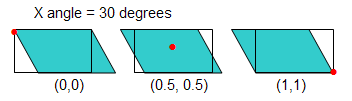
In Figure 1, Origin Points (red dots based on X,Y values below the diagram) affect the way the image is Skewed. Black outlined rectangle is the image original shape. The cyan rectangle is the image Skewed by the X angle of 30 degrees. Note the skew direction with respect to different origin points. Skewing on the Y angle will have a similar effect.
Favorite Values
As a productivity aid, you can save the entire effect (all values on all tabs) as a Favorite with the Save as Favorite Values button. Then you can set all values of an effect from the Favorite values using the Set from Favorite Values button. Separate favorites are saved for each type of effect (Skew, rotation, etc).
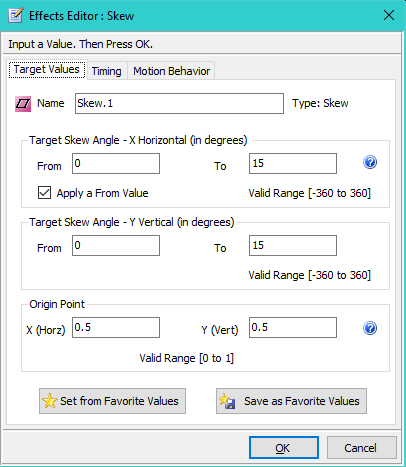
Skew Example
This example shows a video Skewed in both X and Y directions by 15 degrees.