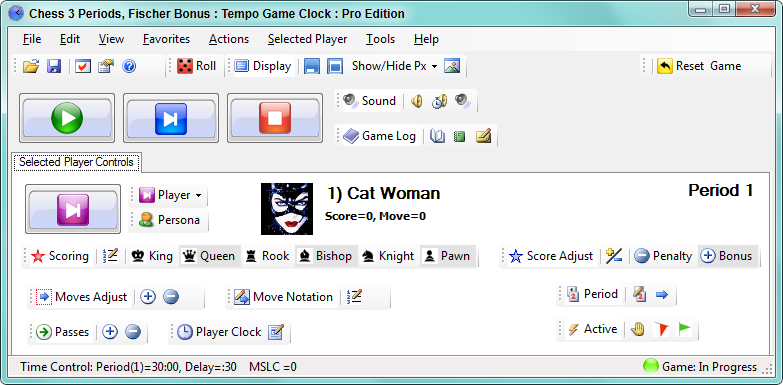
Tempo Game Clock : User's Guide
 Contents
 Language
 Product Home
Game Controls
 Page Bottom
Game buttons
These Start and Stop the game. Next Player button starts the turn of the next player. More detail on
Start
,
Next Player
and
Stop
buttons are detailed the Actions Menu page.
 Game buttons
 To Page Top
Game Reset
Resets the program to begin a new game. More detail can be found on the Actions Menu page.
 Game Reset button
Sound Toolstrip
- Alert Buzzer Sounds the Alert buzzer.
- Period End Buzzer Sounds the Period End buzzer.
- Mute All Sounds Toggles sound on of off. When muted, the program runs in silent mode.
 Sound toolstrip
Game Log Toolstrip
The Game Log Toolstrip has the following functions. Note that while either of these popup dialogs is open, other Controller functions are not available. Specifically, pressing a Move Completed key will not be recognized.
- View Log Pops up a window with the contents of the game log. The log includes all game events (like captured pieces) with a time stamp. Game Statistics are appended at the bottom. (Print or save from this window)
- Game Statistics Pops up a window with the key game statistics (includes moves, pieces captured, clock times, etc.). (Print or save from this window)
- Add Comment Adds a player comment to the game log.
 Game Log toolstrip
 Display Toolstrip
The
Hide All
and
Show All
buttons allow you to quickly make all game displays visible or invisible. And
Show/Hide Player X
pulldown will toggle between show and hide for an individual selected player. The
Toggle Title Bars
button will show or hide all Windows Title Bars on all game displays.
 Display toolstrip
Roll Dice
Rolls the dice. Dice appear in a separate window. Set number of dice to roll under the
Edit
menu.
 Roll dice button