Tempo Game Clock : User's Guide
 Contents
 Language
 Product Home
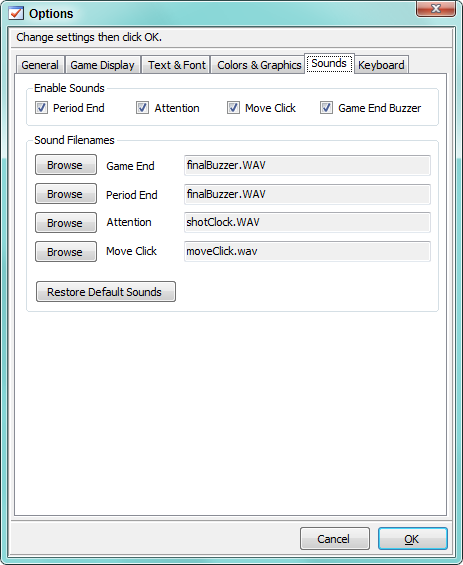
Options - Sound
 Page Bottom
Enable/Mute Sounds
You can
Enable Sounds
by checking the checkbox next to individual program sounds. There is also a
Mute All Sounds
button on the Controller - Sound toolstrip to quickly toggle All sound on/off during play.
 Sound toolstrip
Game Buzzer Sounds
- Period End - Buzzer sounds when a period ends.
- Attention - Request attention of a judge, signal wrong answer or penalty, etc.
- Move Click - Click to signify a move/turn has been completed.
- Game End Buzzer - Buzzer sounds when the game ends either by time expiration or game rule.
 To Page Top
Sound Files
You can pick your own sound files which reside on your computer with the Browse buttons. The format can be any of the Windows Media Player (WMP) supported audio formats (MP3, WAV, WMA, etc). And by installing audio codecs you may extend beyond the usual formats supported by Windows. As a general rule, if the file plays with WMP, then it should work with this program. Windows has a selection of sound files in the C:\WINDOWS\Media folder. Or search the Web for free sounds effects that you can download. The Restore Default Values buttons resets to the original program sound files.