
 Tempo Game Clock : User's Guide
 Contents
 Language
 Product Home
Scrabble Details
 Page Bottom
Scoring
To score a word, click on the
Add Words
button on the Scoring toolstrip. This pops up the
Scrabble Word Editor
dialog to enter your new word. Click the
Edit
button to remove or change scored words for a player.
 : Scoring toolstrip
 To Page Top
Using Scrabble Word Editor
- Word input - Type your new word into the Word input field. Type a blank space (spacebar) where a blank square is used. The total word score is shown to the right of the input field. Bonuses are reset whenever you type into the input field.
- Letter Bonus - With the mouse, select any letter to apply a bonus. Then click the Letter Bonus button (double, triple).
- Word Bonus - To apply a Word bonus click the Word Bonus button (double, triple). Re-double (or re-triple) a word value by clicking the bonus button twice.
- Reset Bonus - Click the Reset Bonus button to remove all bonuses and start over.
- Super Scrabble - Quadruple bonus buttons are provided for Super Scrabble play.
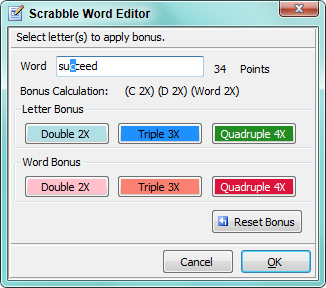
The Bonus Calculation shows bonuses applied to the total word score. The example in Figure 1 shows the word "succeed" with a double letter bonus applied to "C" and "D" (shorthand notation as C 2X and D 2X) , plus a double word bonus (shorthand notation as Word 2X ) .
Time Controls
Number of Periods: 2
Period 1 (Main time): 25 minutes using a Standard Timer. When a player's Main time expires, the player automatically enters an overtime (OT) period.
Period 2 (OT, Overtime): 50 minutes using a Standard Timer. The 50 minutes length is arbitrary. You can reset to any maximum length you like but it must be set before starting the game via
Edit -- Time Controls -- Edit Periods
.
The clock will automatically apply a OverTime
OT Penalty
(-10 points) for each expired time slice of 1 minute during overtime. The number of minutes is rounded up, so for example if a player uses two minutes and five seconds of overtime, the penalty is 30 points.
Change the current
Period Length
if desired via the
Period
toolstrip.
 Period toolstrip
Saving Favorite Time Controls
You can customize the game time controls any way you like, then save the game as a Favorite game for future play. Customization includes: add more periods, change period lengths, set Delay and Bonus, set required moves per period, and many more settings. To customize go to Edit -- Time Control -- Edit Periods .
Official Scoring Rules
Each word formed in the play is scored this way:
- Any tile played from the player's rack onto a previously vacant square that is a "double-letter" or "triple-letter" premium square has its point value doubled or tripled as indicated.
- Add the normal point value of every other letter (excluding blanks) in the word (whether newly played or existing).
- For each newly played tile placed on a "double-word" premium square, the total is doubled (or redoubled).
- For each newly placed tile placed on a "triple-word" premium square, the total is tripled (or re-tripled).
- Premium squares affect the score of each word made in the same play by constituent tiles played upon those squares. Premium squares, once played upon, are not counted again in subsequent plays.
When the letters to be drawn have run out, the final play can often determine the winner. This is particularly the case in close games with more than two players. The player who goes out first gets the point values of all remaining unplayed tiles added to their score. Players with tiles remaining on their rack have their equivalent point values removed from their score.
Penalty and Bonus Points
Default values are set for Overtime (OT) Penalty (-10), Pick (1), and Bonus (50). You can edit penalty and bonus values which appear on the
Score Adjust
toolstrip by
Edit -- Game Type Attributes -- Penalty and Bonus Points
. You can also adjust a player's score by any amount with the
Plus-Minus
button on the
Score Adjust
toolstrip
 Score Adjust toolstrip
