
 Tempo Game Clock : User's Guide
 Contents
 Language
 Product Home
Personas
 Page Bottom
About Personas
First, Personas are OPTIONAL -- you do not need to use them. If you want to personalize the Game Displays, read on. The Persona features are found under the
Edit -- Player Persona
menu.
What is a Persona?
A Persona is a simple profile with information about a player. Create personas for players you commonly play. Then before starting a new game, assign a persona to each player. The Screen Name is the name that appears on the game display and for logging player activity.
 To Page Top
Manage Personas
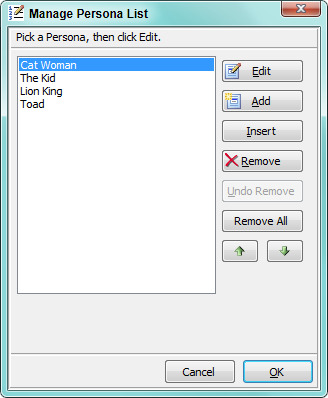
Before you can apply a persona, you need to create it. You can literally create a new persona in less than a minute. Open Edit -- Player Persona -- Manage Personas to bring up the Persona List Selector (Figure 1). Pick an existing Persona in the list, then click the Edit button to edit that Persona. Or click the Add button to create a new Persona for editing. Insert creates a new Persona and places it in the list at the current selected position.
Assign Persona to Player
You can assign a persona to each player. You will be prompted to select a Player number , then prompted to select the Persona to assign to that player.
View Persona Assignments
This lists all the current assigned Personas by player. And shows the list of default personas used if you do not assign a persona to a player.
Remove Persona from Player
Removes the linkage of a persona to a player. You will be prompted to select a Player number . This will NOT delete any personas you have created.
Reset all players to default persona
This effectively removes all the Personas assignments you have made and sets all players to the default Personas. It will NOT delete any personas you have created.
Persona Editor
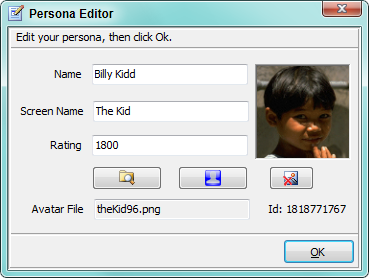
The only field is that is required for a Persona is the Screen Name (see Figure 2). Fields are as follows:
- Name - Player's real name, nickname or initials. Printed in the Game Stats.
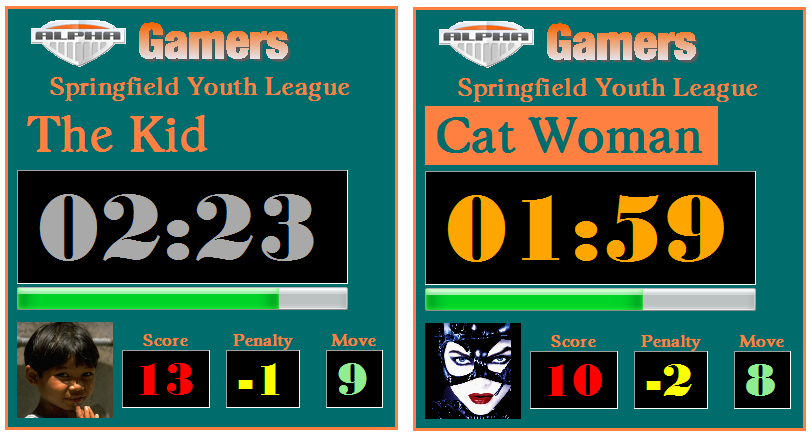
- Screen Name - Player screen name displayed at the top of the Game Display (see Figure 3).
- Rating - Player ELO rating if known. ELO is a skill rating generally used in chess and is printed in the Game Stats. In general, 1200 is considered a bright beginner. A regular competitive chess player is rated at around 1750.
- Avatar File - This is the player image file to be displayed in the player image box on the lower section of the Game Display (see Figure 3). You can use any of the eight standard colored Avatars or select you own custom image.
- Browse for Avatar - The Browse button will open a file selection dialog. Browse to select a custom Avatar file.
- Set to a standard Avatar - Pops up a list of the standard program Avatars for selection.
- Clear Avatar File - Clears the entry for the Avatar file. The Avatar will revert to one of the standard colored Avatars. This button does not delete the image file itself from your hard drive.
Avatar Image Formats and Size
Most photo images you take with a digital camera will work as is. But for optimal results (but not required), the image should be cropped to a square size (ex. 48x48, 96x96 pixels, etc.). Images that are not square will be streched or squeezd to fit the square box depending on the width to height ratio. It won't hurt anything to try an image. Most graphic formats will work ( bmp, jpg, png, gif, ...) including animated gifs and instant messaging icons.
