
 Sound Mill X3 : User's Guide
 Contents
 Language
 Product Home
Play Position group
 Page Bottom
Locator: Sound List Editor.
Using Play Position Controls
The
 Play Position
group contains the following controls.
Play Position
group contains the following controls.
-
Playback Time Readout - Format, Minutes : Seconds / Length
- Toggle Time Readout Type - Toggle playback time readout between Current Playback Time Position or Time Remaining by mouse clicking on the time readout text.
- Position - Current playback time position.
-
Remaining - Playback time remaining in the media. When showing remaining time, the time is prefixed with an hour glass symbol(
 ). (ex. 2:00/3:00)
 - Length - Total media length.
- Volume % - Volume is the current playback volume and is updated during fade-in and fade-out changes.
- Play Position Progress Bar - Updated continuously during playback to indicate the play position along the play timeline.
-
Play Marker Indicators - Along the placement time-line ruler
, marker shapes indicate positions of play markers (See Figure 2,
Start, Stop
and
Fade
markers). Marker processing can be disabled globally (for all Sound Items) from the
Behavior
menu and will be indicated with the marker disabled symbol (
 ) at the right end of the marker row.
 - Play Position Trackbar - During play, if the trackbar position is moved, sound play position will be set to the trackbar position. The time position of the Track bar is shown to the right of the Middle Quick Set button.
-
Play Position Quick Set -
Set to Start
(
 ),
Middle
(
),
Middle
(  ) and
Set to End
(
) and
Set to End
(  ) - These are quick set buttons to move the Play Position to a pre-defined position on the track.
-
Set to Progress Postion
 - Clicking the
Set to Progress Postion
button, sets the trackbar to the current value of the Play progress bar. This is sometimes useful when play is paused and you want to set a marker at the current paused position.
- Clicking the
Set to Progress Postion
button, sets the trackbar to the current value of the Play progress bar. This is sometimes useful when play is paused and you want to set a marker at the current paused position.
-
Streaming Media Indicator
 - If the Sound Item is Streaming Media, this indicator will be displayed to the right of the Play Position Progress Bar. Times are often undefined for Streaming Media.
 -
Paused Indicator
 - If the Sound Item is currently paused, the Paused indicator will be displayed to the left of the Play Position Progress Bar.
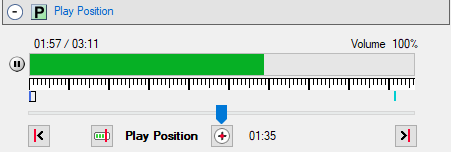
Figure 1. Play Position group
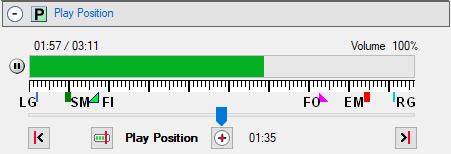
Figure 2. Marker Position Indicators
 Start-At marker;
FI
Start-At marker;
FI  Fade-In marker;
FO
Fade-In marker;
FO  Fade-Out marker;
EM
Fade-Out marker;
EM  End-At marker;
RG Right Guide.
End-At marker;
RG Right Guide.

 To Page Top