
 Sound Mill X3 : User's Guide
 Contents
 Language
 Product Home
Easy Player Options
 Page Bottom
Locator: Sound List Editor > Tools > Options .
Easy Player Behaviors
- Number of button rows for Page Up/Down - This determines the number of rows of buttons that are scrolled when you click Page Up or Page Down in the Player window.
-
End Show Mode Shortcut Key - Specifies the keyboard key (or key combination) to exit the Easy Player out of Show Mode (full screen mode). This allows the player to mimic other common players that exit full screen mode with the 'Escape' key.
- Edit Key - The edit pencil button pops up the Shortcut Key editor.
- None - This sets the key to 'None'. (Caution: make sure you have an action shortcut set up to exit show mode or you will be stuck in show mode)
- If you have a handheld remote control device that sends an 'Escape' (Esc) keystroke and you want to use the Esc key for a Player action shortcut, this should be set to a key other than 'Escape'.
- For Kiosk use, you may want to set it to 'None' (or a hard to guess combination, ex. Ctrl+Shift+X) so that mischievous users cannot easily guess the exit key.
- Preserve Default Title Text on New Playlist - If checked, when you create a New Playlist, the Title Text from the current default Playlist attritutes is preserved. If unchecked, the Title Text of the new Playlist is set to the Name of the Playlist (ex. Playlist.2).
-
Highlight Current Playing Cue Button - If checked, when a Cue button begins to play it will be highlighted with this special
Current Playing Cue Button Highlight
color. This allows you to keep track of which cue is currently playing while you move the button focus with the Arrow keys (or another move focus method).
Click the Set Highlight Color button to change the colors (foreground/background). If you use a background image on the cue buttons (such as the black graphite image on the LION button below), the background color of the Highlight colors may not show through. However the button text will use the foreground color. So if the image is dark, make sure the foreground color you assign will show up against a dark background. - Play First Cue when Auto-Load Playlist at Startup - When checked, if you load a Playlist on program start-up (via a batch file parameter), this will Play the first Playlist Cue immediately.
- When Opening Player, Open Most Recently Used Playlist - Since Playlists are contained inside each SoundList, you must have the SoundList opened before opening the Player, otherwise this will fail.
Highlight Current Playing Cue Button - Example
Figure 1 shows a cue button table with 5 buttons.
In graphic A, the "One" button is the focused button, highlighted with the focused button color (reverse video).
In graphic B, the Play button is pressed and the "One" cue button begins playing making it the
Current Playing Cue Button
and is highlighted. Also the focus is moved (with the Arrow Key) to button "Three" which is highlighted with the focused button color.
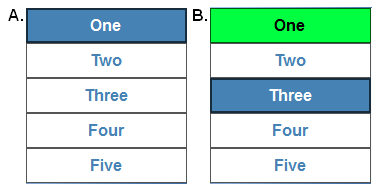
Figure 1. Current Playing Cue Button Highlight - Example
 To Page Top
Playlist Default Images
Use the Open filename button to set these settings that allow you to override default images for the player. If you move these images to a new folder location after setting these values, then the Player will not find them and will display a Missing Image symbol ( ). Use the
Delete
filename button to revert back to the program default image.
). Use the
Delete
filename button to revert back to the program default image.
- Marquee Image - See the chiseled marble "Darwin Museum" image in Figure 3.
- Player Background Image - See the photo of the African plains in Figure 3.
- Button Background Image - This allows you to replace the default 3D black graphite look of the cue buttons. See cue button sample to the right.

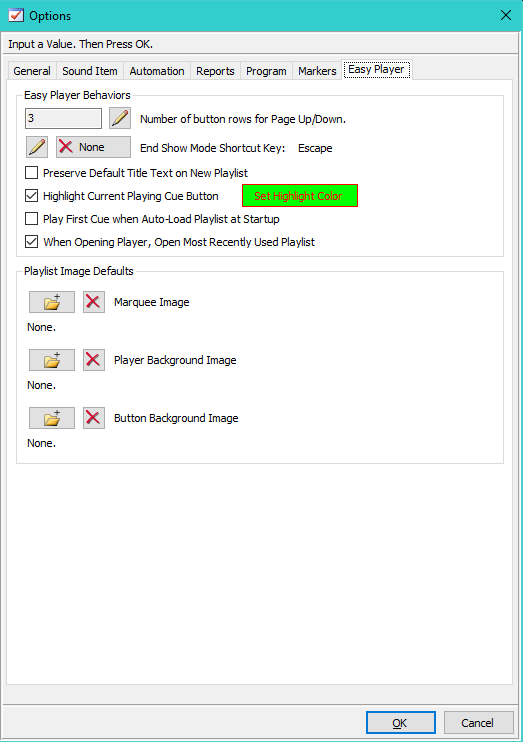
Figure 2. Player Options dialog
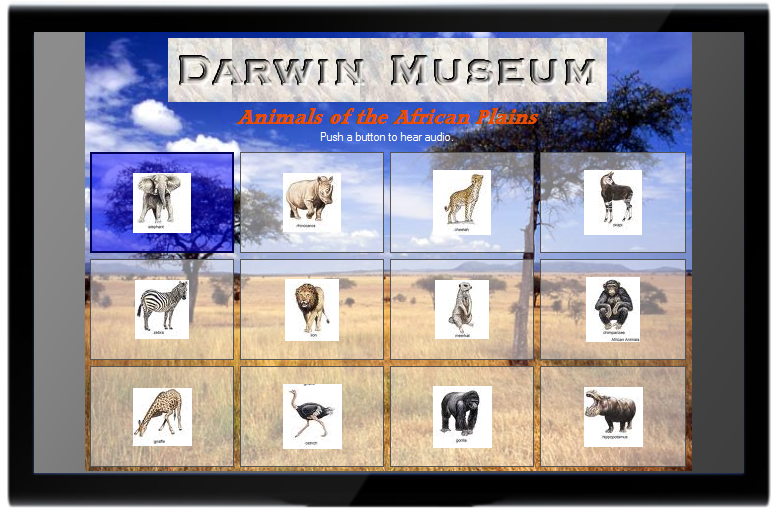
Figure 3. Easy Player - Use Cue Button Images for Kiosk Visual Design
