
 Matrix Mic & Player : User's Guide
 Contents
 Language
 Product Home
View Menu
 Page Bottom
View Menu
The View menu has the following functions. Note that you can also expand and collapse program control panels by clicking on the panel title bars (Figure 1).
Menu items
- Expand All panels - Click to expand all control panels of the program window.
- Collapse All panels - Click to collapse all control panels of the program window.
- Microphone panel - Click to toggle Expand/Collapse of the panel for the Microphone controls.
- Player panel - Click to toggle Expand/Collapse of the panel for the audio file Player controls.
- Volume panel - Click to toggle Expand/Collapse of the panel for the device Volume controls.
- Playlist Panel - Click to toggle Expand/Collapse of the Playlist Panel which shows the current Playlist items. (left side panel on Figure 1)
- Tool bars - These items toggle visibility of each tool bar between Show / Hide.
- File
- Player
- Player Options
- Configuration
- Reset Toolbars - Resets position and visibility of all toolbars and menu items. Requires a program restart.
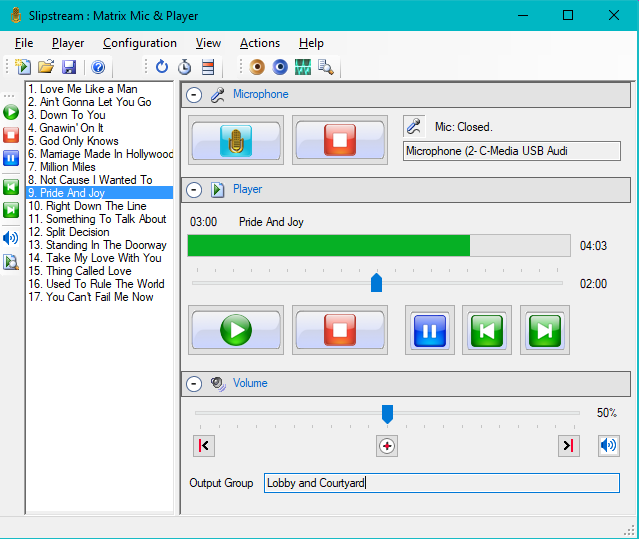
Figure 1. Matrix Mic program window

 To Page Top