
 Matrix Mic & Player : User's Guide
 Contents
 Language
 Product Home
Actions Menu
 Page Bottom
Actions Menu
The Actions menu has the following functions.
 To Page Top
Microphone Operation
The actions menu functions are also available from the Microphone controls section (Figure 1).
Menu items
- Start Mic Broadcast - Opens the microphone and begins broadcasting to the devices contained in the current selected Output Group. The Mic status indicator (Figure 1) will say "Open" and will be highlighted.
- Stop Mic Broadcast - Closes the microphone and stops broadcast mode. The Mic status indicator (Figure 1) will say "Closed".

Figure 1. Microphone section
Player Operation
The actions menu functions are also available from the Player controls section (Figure 2). This section also has a Position scrubber bar to adjust the play position of any playing item.
Menu items
- Play - Play starts with the selected Playlist item. If the item is already playing, play restarts at the beginning of the audio. If another Playlist item is currently playing it is stopped. Play continues until all Playlist items have played once. There are additional options in the Player menu to modify the Player behavior.
- Stop - Stops playback of any currently playing audio.
- Pause/Resume - Toggles between Pause and Resume of any currently playing audio.
- Previous - Selects the previous Playlist item. If currently in playback mode, the newly selected item begins playing.
- Next - Selects the next Playlist item. If currently in playback mode, the newly selected item begins playing.
- Mute Toggle - Toggles sound Mute On/Off. Mute applies to both the Mic broadcast and the audio Player.
Playback Position trackbar
You can move to any time position by dragging the Playback Position trackbar pointer (Figure 2) to a point along the Track's audio timeline.
Audio Track Time Readouts
- A - Current Playback Position (to left of Track Name).
- B - Track Length (at right of progress bar).
- C - Position Trackbar pointer time (at right of trackbar).
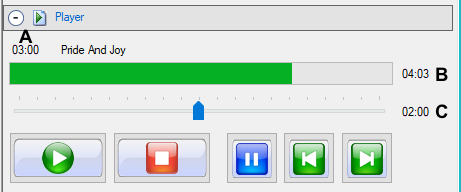
Figure 2. Player section
Player tool bar
- Play tool bar - Buttons (Figure 3, from left to right): Play, Stop, Pause/Resume, Previous, Next, Mute Toggle, and View Playlist (Play, Stop, Pause/Resume, Previous, Next, Mute Toggle, and View Playlist) .

Figure 3. Play tool bar
